



Creating Websites with AI in 5 Minutes: A Beginner’s Guide
Welcome to the world of AI-powered web design! In this presentation, we’ll explore how you can harness the power of artificial intelligence to create stunning websites in just 5 minutes. Whether you’re a small business owner, a creative professional, or simply someone looking to establish an online presence, this guide will show you how AI can revolutionize your web development process.
The AI Web Design Revolution

✅ Democratizing Web Design
AI is making web design accessible to everyone, regardless of coding experience.
✅ Time-Saving Solution
Create professional-looking websites in minutes instead of days or weeks.
✅ Customization at Scale
AI tools offer personalized designs while maintaining efficiency.
✅ Constant Innovation
AI-powered platforms continuously evolve, offering cutting-edge features.
Benefits of AI-Powered Web Design
Speed and Efficiency
AI algorithms can generate entire websites in minutes, dramatically reducing development time. This efficiency allows businesses and individuals to launch their online presence quickly, responding to market demands or personal goals without delay.
Cost-Effective Solutions
By automating much of the design and development process, AI-powered tools significantly reduce the cost of creating a website. This makes professional web design accessible to startups, small businesses, and individuals with limited budgets.
No Coding Required
AI web design tools typically feature intuitive interfaces that don’t require coding knowledge. This democratizes web development, allowing anyone to create a sophisticated website without learning complex programming languages.
Step 1: Choose Your AI Web Design Platform

📌 Wix ADI
Known for its user-friendly interface and extensive template library.
📌 Squarespace AI
Offers sleek, modern designs with robust e-commerce features.
📌 Webflow AI
Provides more advanced design capabilities for those wanting greater control.
📌 Other AI Tools
Emerging platforms like The Grid and Firedrop offer unique AI-driven approaches.
Comparing AI Web Design Platforms
| Platform | Ease of Use | Design Flexibility | AI Capabilities | Pricing |
|---|---|---|---|---|
| Wix ADI | Very Easy | Moderate | Strong | Starts at $16/month (Light Plan), with higher plans like Core at $27/month. |
| Squarespace AI | Easy | Good | Moderate | Plans range from $16/month (Personal) to $52/month (Advanced Commerce). |
| Webflow AI | Moderate | Excellent | Emerging | Starts at $14/month (Basic Plan), with Business plans at $39/month. |
| The Grid | Easy | Limited | Very Strong | The Grid appears to no longer actively provide updated pricing or services. |
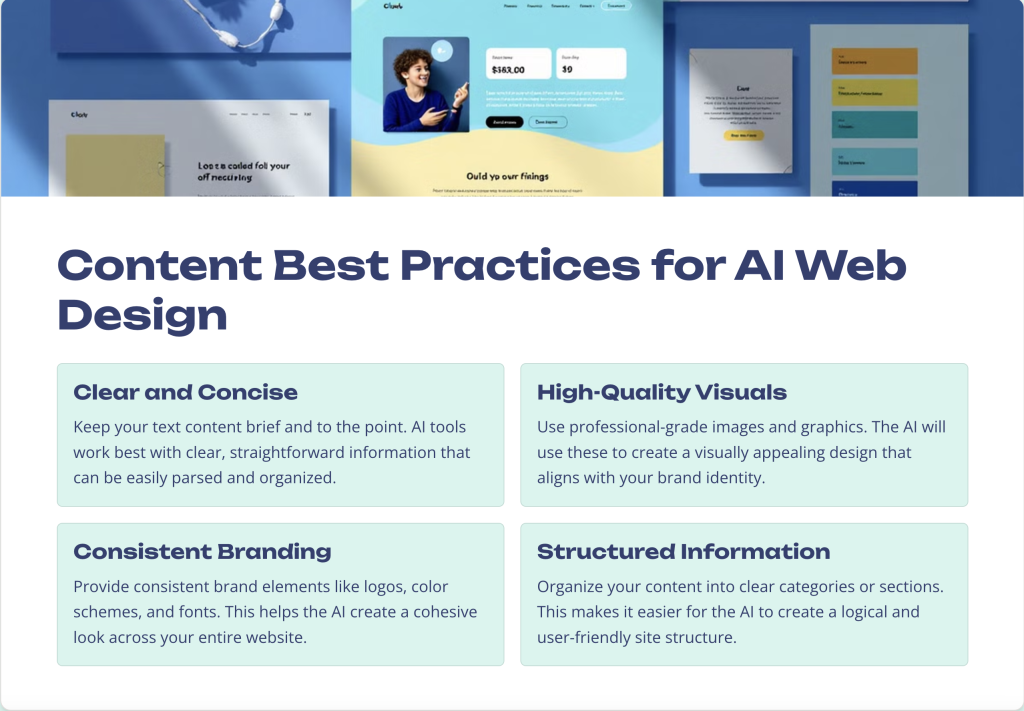
Step 2: Gather Your Website Content

✔️ Define Your Purpose
Clearly outline the goals and objectives of your website. This will guide the AI in creating a tailored design that meets your specific needs.
✔️ Collect Text Content
Prepare your website copy, including headlines, descriptions, and any other textual information you want to include on your site.
✔️ Select Images and Media
Gather high-quality images, logos, and videos that represent your brand or message. These visual elements will be crucial in creating an engaging website.
✔️ Organize Information
Structure your content into logical sections or pages. This will help the AI understand how to layout your website effectively.
Step 3: Input Your Information
Create an Account
Sign up for your chosen AI web design platform. Most offer free trials, allowing you to explore their features before committing.
Answer Questions
The AI will ask you a series of questions about your business, goals, and preferences. Be as specific as possible to get the best results.
Upload Content
Provide the text, images, and other media you gathered in Step 2. The AI will use this to populate your website.
Set Preferences
Choose color schemes, fonts, and layouts that align with your brand. The AI will use these preferences to guide its design decisions.
Key Information to Provide
- Business Name and Type
- Target Audience
- Website Purpose
- Key Features Needed
- Design Preferences
Providing clear and detailed information in these areas will help the AI create a website that truly represents your brand and meets your specific needs. Remember, the more accurate and comprehensive your input, the better the AI’s output will be.
Step 4: Let AI Work Its Magic

AI Analysis
The AI processes your inputs, analyzing your content and preferences to determine the best design approach.
Design Generation
Using advanced algorithms, the AI creates multiple design options tailored to your needs.
Content Population
Your provided content is automatically arranged within the chosen design framework.
Optimization
The AI optimizes the layout for various devices and screen sizes, ensuring responsiveness.
Behind the Scenes: How AI Designs Your Website
Machine Learning Algorithms
AI web design tools use sophisticated machine learning algorithms trained on thousands of successful websites. These algorithms analyze design trends, user behavior, and effective layouts to create optimal designs for your specific needs.
Natural Language Processing
The AI uses NLP to understand the context and intent of your content. This allows it to make intelligent decisions about content placement, headline hierarchy, and overall site structure.
Computer Vision
Advanced computer vision techniques analyze your images and graphics, determining optimal placement, sizing, and color schemes that complement your visual content.
Step 5: Review and Customize
- Evaluate AI-Generated Designs
- Select Preferred Layout
- Fine-tune Content Placement
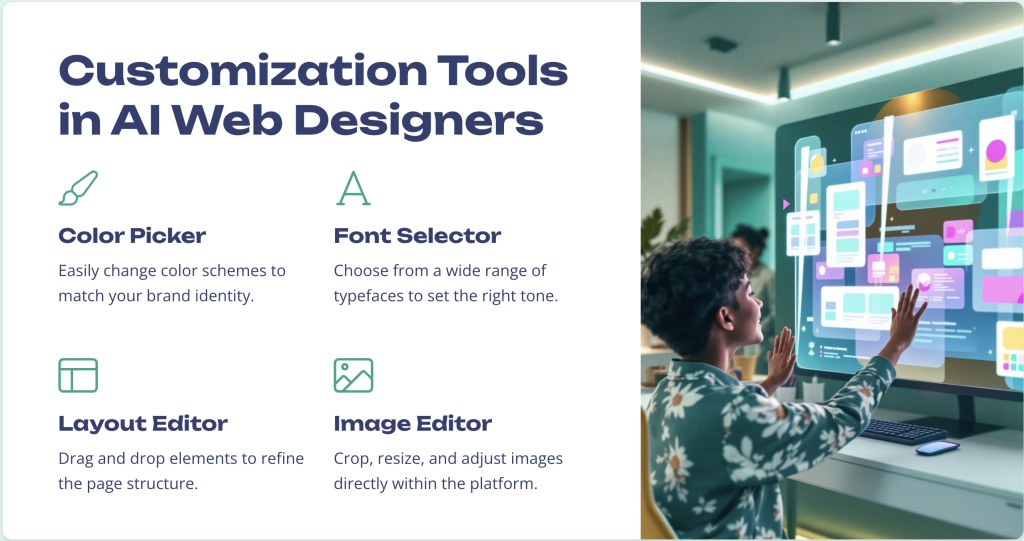
- Adjust Colors and Fonts
- Add or Remove Elements
While AI does the heavy lifting, your input is crucial for the final touches. Take time to review the generated designs and make any necessary adjustments to ensure the website perfectly aligns with your vision.
Common Customization Pitfalls to Avoid
⭕ Over-customization
Resist the urge to change everything. The AI’s initial design is based on best practices and data-driven decisions. Too many changes can disrupt the cohesive design.
⭕ Ignoring Responsive Design
Ensure your customizations look good on all devices. What works on desktop might not translate well to mobile.
⭕ Inconsistent Branding
Maintain consistency in colors, fonts, and style across all pages. Inconsistency can confuse visitors and weaken your brand identity.
⭕ Cluttered Layout
Avoid the temptation to add too many elements. A clean, focused design is often more effective than a busy one.
Enhancing Your AI-Generated Website
Add Custom Functionality
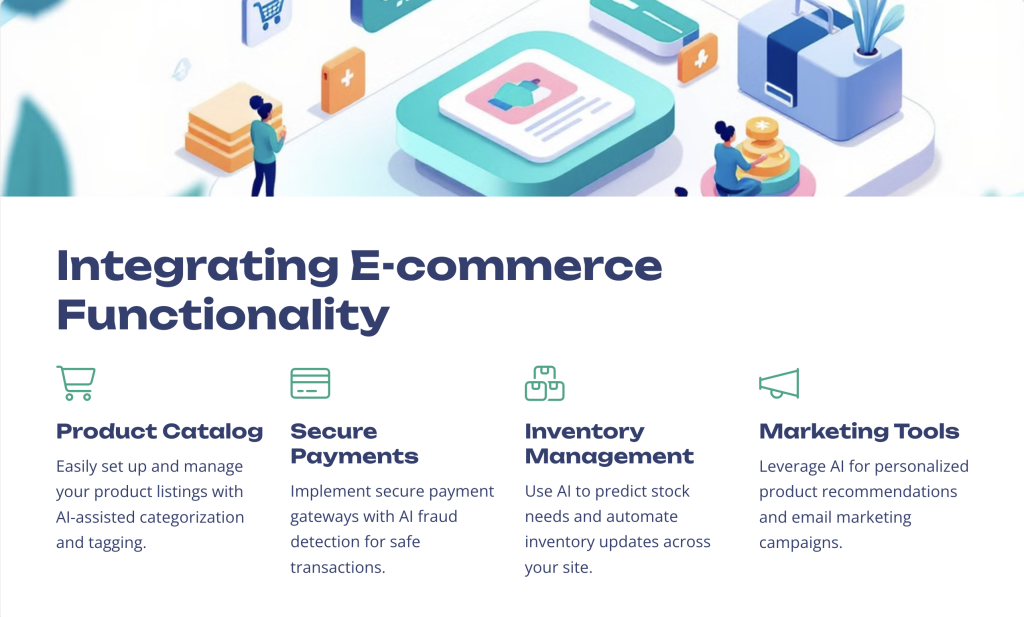
Integrate features like contact forms, booking systems, or e-commerce capabilities to meet your specific needs.
Optimize for SEO
Use built-in SEO tools to improve your site’s search engine visibility. Add relevant keywords, meta descriptions, and alt text for images.
Implement Analytics
Set up website analytics to track visitor behavior and gather insights for future improvements.
Create Engaging Content
Regularly update your website with fresh, relevant content to keep visitors coming back and improve SEO.
AI-Powered SEO Optimization
Keyword Analysis
AI tools can analyze your content and suggest relevant keywords to improve your search engine rankings. They can also help you understand which keywords your competitors are targeting, giving you a competitive edge.
Content Optimization
Advanced AI algorithms can analyze your website content and provide suggestions for improvement. This includes recommendations for headline structures, content length, and readability enhancements that align with current SEO best practices.
Technical SEO
AI can automatically handle many technical SEO aspects, such as generating sitemaps, optimizing page load speeds, and ensuring mobile responsiveness. This frees you to focus on creating great content while the AI handles the technical details.
Leveraging AI for Content Creation
AI-Generated Product Descriptions
Use AI writing tools to create unique, SEO-friendly product descriptions at scale.
Automated Blog Posts
Generate blog content ideas and even entire articles with AI writing assistants.
Image Generation
Create custom graphics and images using AI art generation tools.
Personalized Content
Implement AI-driven content personalization to tailor the user experience.
The Future of AI in Web Design
- Hyper-Personalization
- Voice-Driven Interfaces
- Predictive Design
- Automated Updates
- Enhanced Accessibility
As AI technology continues to advance, we can expect even more sophisticated web design tools. These innovations will likely include real-time personalization based on user behavior, voice-controlled website navigation, and designs that automatically adapt to emerging trends and user preferences.
Advantages of AI Web Design Over Traditional Methods

Speed and Efficiency
AI can generate complete websites in minutes, compared to the days or weeks required for traditional design methods. This rapid development allows businesses to quickly establish an online presence or test different concepts.
Cost-Effectiveness
By automating much of the design process, AI significantly reduces the cost of website creation. This makes professional-looking websites accessible to small businesses and individuals with limited budgets.
Data-Driven Design
AI algorithms analyze vast amounts of data on user behavior and design trends to create optimized layouts. This data-driven approach often results in websites that perform better in terms of user engagement and conversion rates.
Limitations of AI Web Design
Creative Constraints
While AI can create functional and attractive designs, it may struggle with highly unique or creative concepts that require human intuition.
Limited Customization
Some AI platforms may offer fewer customization options compared to traditional web design methods, potentially limiting the uniqueness of your site.
Learning Curve
Despite being user-friendly, there’s still a learning curve to effectively use AI web design tools and understand their capabilities.
Dependence on Input Quality
The quality of the AI-generated website heavily depends on the quality and clarity of the input provided by the user.
Case Study: Small Business Success with AI Web Design

Challenge
Local bakery “Sweet Delights” needed an online presence but lacked the budget for a professional web designer.
Solution
Used Wix ADI to create a website in 3 hours, including an online ordering system.
Implementation
Customized AI-generated design with brand colors and high-quality food photography.
Results
50% increase in orders within first month, positive customer feedback on user-friendly design.
AI Web Design for Different Industries


AI web design tools can cater to a wide range of industries, adapting their output based on the specific needs and conventions of each sector. From tech startups to local craftsmen, these tools offer tailored solutions that align with industry expectations and best practices.
Tips for Maximizing AI Web Design Tools
Clear Vision
Have a clear idea of your website’s purpose and target audience before starting.
Brand Assets
Prepare high-quality logos, images, and brand guidelines for consistent design.
Explore Options
Generate multiple designs and compare them to find the best fit for your needs.
Mobile-First
Prioritize mobile responsiveness in your design choices and customizations.
Common Mistakes to Avoid in AI Web Design
Overreliance on AI
While AI is powerful, it’s important to review and refine its output. Don’t assume the first design is perfect.
Ignoring Brand Guidelines
Ensure the AI-generated design aligns with your existing brand identity and guidelines.
Neglecting SEO
Don’t forget to optimize your content and meta tags for search engines, even if the AI handles the design.
Skipping User Testing
Always test your website with real users to ensure it meets their needs and expectations.
Maintaining and Updating Your AI-Generated Website
Regular Content Updates
Keep your website fresh and relevant by regularly updating content. Many AI platforms offer easy-to-use content management systems.
Performance Monitoring
Use built-in analytics tools to track your website’s performance and make data-driven improvements.
Security Updates
Ensure your website remains secure by keeping all systems and plugins up to date.
Design Refreshes
Periodically use the AI to suggest design updates based on current trends and your evolving needs.
The Role of Human Creativity in AI Web Design

Strategic Direction
While AI can handle the technical aspects of web design, human creativity is crucial in setting the overall strategy and vision for the website. This includes defining the brand voice, target audience, and key messages.
Content Creation
Although AI can assist with content generation, human input is essential for creating authentic, engaging content that resonates with your audience. This includes crafting compelling copy, storytelling, and ensuring the content aligns with your brand values.
Emotional Intelligence
Humans bring emotional intelligence to the design process, understanding nuances in user psychology and cultural context that AI might miss. This is crucial for creating websites that not only look good but also connect emotionally with users.
Ethical Considerations in AI Web Design
Data Privacy
Ensure that the AI platform you use adheres to data protection regulations and respects user privacy.
Transparency
Be clear about the use of AI in your website’s creation, especially if it’s generating content.
Accessibility
Verify that the AI-generated design meets accessibility standards for users with disabilities.
Bias Mitigation
Be aware of potential biases in AI algorithms and take steps to ensure your website is inclusive and representative.
The Future of Web Design: AI and Beyond
Present: AI-Assisted Design
AI tools streamline the web design process, making it accessible to non-designers.
Near Future: Advanced Personalization
Websites will adapt in real-time to individual user preferences and behaviors.
Mid-Term: Immersive Experiences
Integration of AR and VR technologies for more engaging web interactions.
Long-Term: Thought-Driven Interfaces
Potential development of brain-computer interfaces for intuitive web navigation.
Conclusion: Embracing the AI Web Design Revolution

Democratization of Design
AI web design tools are making professional-quality websites accessible to everyone, regardless of technical skill or budget.
Efficiency and Innovation
The speed and capabilities of AI-driven design are pushing the boundaries of what’s possible in web development.
Continuous Learning
As AI technology evolves, staying informed about new features and best practices will be crucial for success.
Human-AI Collaboration
The future of web design lies in the synergy between human creativity and AI capabilities, creating better, more effective websites.
Leave a Reply